
Schedule it once.
Idle Pilot handles the dot.
Cloud-based Slack presence. Per-day schedules, lunch breaks, vacation mode, and a clean activity history. Built so the green dot reflects your hours, not your keyboard.
7-day free trial. 14-day money-back guarantee. Cancel anytime.
Work Hours Scheduling
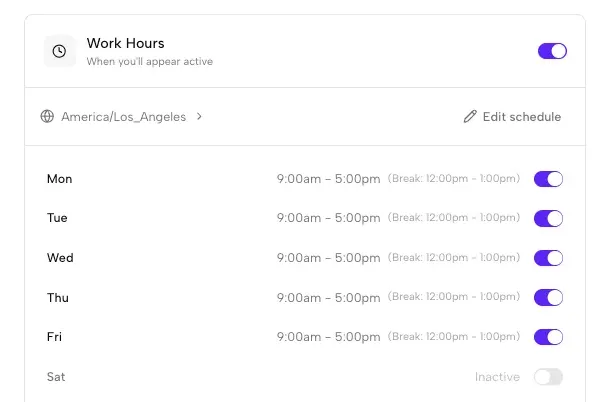
The heart of Idle Pilot: per-day work hours with optional lunch breaks.
Work Hours Scheduling
Configure your Slack presence schedule for each day of the week with start and end times, lunch breaks, and timezone-aware automation. Your status stays green during the hours you set, even when your laptop is closed.
- Different hours for each day of the week
- Optional lunch breaks with custom times
- Automatic timezone detection and handling
- Toggle individual days on or off
Vacation Mode & Activity History
Smart automation and visibility into your presence patterns
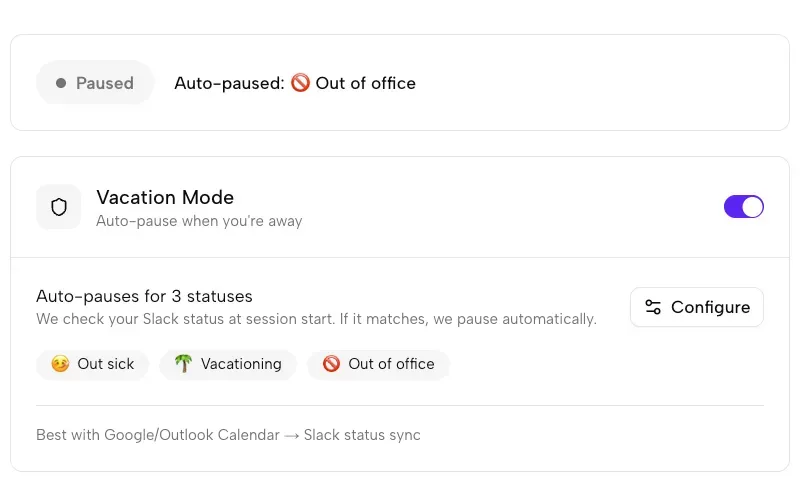
Vacation Mode
Automatically pause your scheduled presence when your Slack status changes to one you select (like "Vacationing" or "Out of Office"). Works with Slack's calendar sync for hands-free pausing.
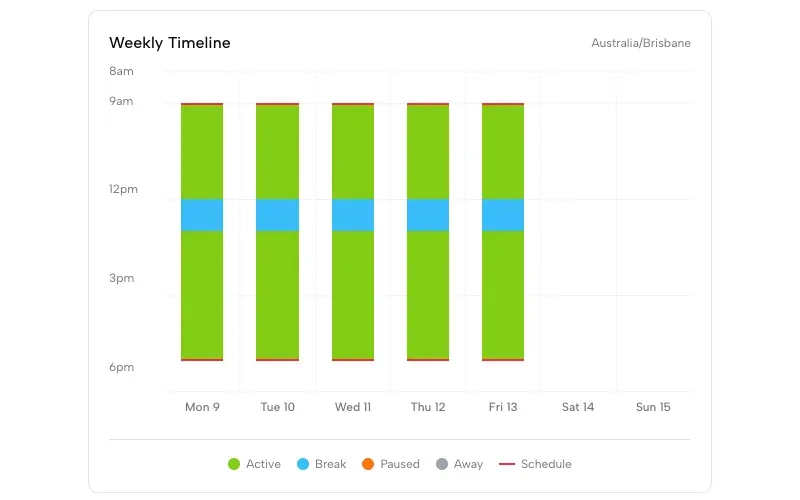
Activity History
View a visual timeline of your Slack presence. See when you were active, when breaks occurred, and track your presence patterns over time.
All Features
Everything you need for Slack presence management
From setup to daily use, Idle Pilot handles your Slack status
Chrome Extension
Connect your Slack workspace in one click with our optional Chrome extension. The fastest way to get started with Idle Pilot.
Manual Setup
Prefer Firefox, Safari, or Edge? Use our manual setup flow that works with any browser. Takes about 5 minutes.
Cloud-Based
Your presence runs from our cloud servers, not your device. Close your laptop, switch devices, or go offline - your Slack status stays green during scheduled hours.
No Admin Approval
Connect using your own Slack account. No workspace bot, no IT tickets, no admin permissions required.
Instant Off
Pause your schedule or disconnect completely with one click. Your Slack presence returns to normal immediately.
Presence Only
Idle Pilot only manages your online/away status. It never reads, sends, or accesses your Slack messages, files, or channels.
Features FAQ
Common questions about Idle Pilot features
How do I set different hours for different days?
In your Idle Pilot dashboard, each day of the week has its own toggle and time settings. You can set Monday 9am-5pm, Tuesday 10am-6pm, and so on. Each day can also be turned off entirely.
Can I add a lunch break to my schedule?
Yes. Each day supports an optional lunch break with custom start and end times. Your status will go away during the break and return to active afterward.
How does Vacation Mode work?
Vacation Mode monitors your Slack status. You select which workspace statuses should trigger a pause (like "Vacationing" or "Out of Office"). When your Slack status matches, Idle Pilot automatically pauses. This works great with Slack's calendar sync.
Does the Chrome extension stay installed?
The Chrome extension is only used during initial setup to connect your Slack workspace. After setup, you can remove it if you prefer. Idle Pilot runs from the cloud, not the extension.
What if I use multiple Slack workspaces?
Currently, Idle Pilot supports one connected workspace at a time. You can disconnect and connect a different workspace whenever you need to switch.
How do I view my activity history?
Your Idle Pilot dashboard shows a timeline of your presence activity. You can see when your status was active, when breaks occurred, and review patterns from previous days.
Ready to put the green dot on a schedule?
Start free in 2 minutes. No credit card. 14-day money-back guarantee.

— r/remotework
The green dot follows your schedule, not your keyboard.