
Schedule it once.
Idle Pilot handles your availability.
Cloud presence for Slack or Microsoft Teams, per-day schedules, Lunch Break, Vacation Mode, Activity History, and instant controls.
3-day free trial · No credit card
Work Hours Scheduling
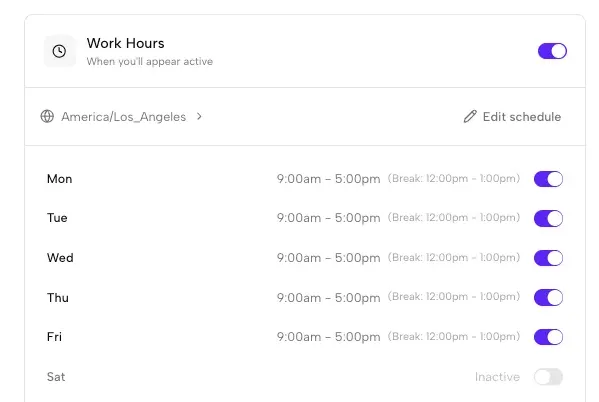
The heart of Idle Pilot: per-day work hours with optional lunch breaks.
Work Hours Scheduling
Configure presence for your selected platform with daily start and end times, Lunch Break, and timezone-aware automation. Your availability follows those hours even when your laptop is closed.
- Different hours for each day of the week
- Optional lunch breaks with custom times
- Automatic timezone detection and handling
- Toggle individual days on or off
Vacation Mode & Activity History
Smart automation and visibility into your presence patterns
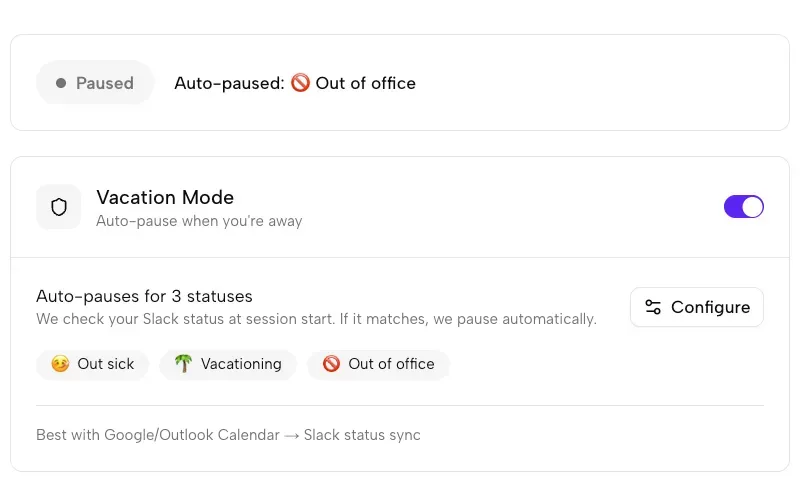
Vacation Mode
Automatically pause scheduled presence when the status on your connected platform changes to one you selected, such as Vacationing or Out of Office.
Activity History
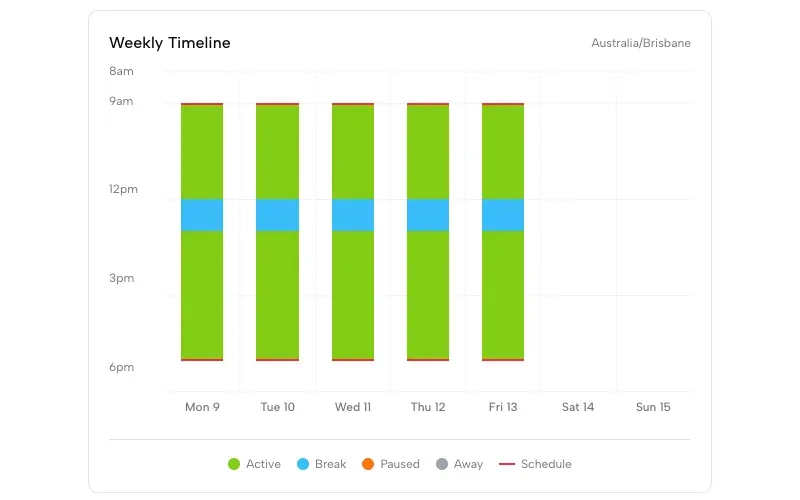
View a timeline of scheduled presence. See when Idle Pilot maintained availability, paused for breaks, or stopped.
All Features
Everything you need for scheduled availability
From setup to daily use, Idle Pilot follows the rules you choose
Chrome Extension
The setup extension links your account in desktop Chrome. Remove it after linking; your schedule runs on our servers.
Manage from any browser
Link your account in desktop Chrome first. Then use Firefox, Safari, Edge, or your phone to change your schedule.
Cloud-Based
Presence runs from our cloud servers, not your device. Close your laptop, switch devices, or go offline—your selected platform stays available during scheduled hours.
Presence Only
Idle Pilot manages availability without reading chats, DMs, channels, teams, files, or other platform content.
Instant Off
Pause your schedule or disconnect completely with one click. Your platform presence returns to normal immediately.
User-Controlled Rules
You decide the work hours, break windows, timezone, and vacation pauses. Idle Pilot follows the schedule you configure.
Using Microsoft Teams? Read how to keep Microsoft Teams status green.
Features FAQ
Common questions about Idle Pilot features
How do I set different hours for different days?
In your Idle Pilot dashboard, each day of the week has its own toggle and time settings. You can set Monday 9am-5pm, Tuesday 10am-6pm, and so on. Each day can also be turned off entirely.
Can I add a lunch break to my schedule?
Yes. Each day supports an optional lunch break with custom start and end times. Your status will go away during the break and return to active afterward.
How does Vacation Mode work?
Vacation Mode is a Slack feature. Select the Slack status presets that should pause Idle Pilot. It checks for a match at the start of a presence session, not continuously. To stop an active session immediately, turn Work Hours off. Teams users can pause with the Work Hours or weekday switches.
Does the Chrome extension stay installed?
The Chrome extension is only used during supported initial setup flows. After connection, you can remove it. Idle Pilot runs from the cloud, not the extension.
Does Freedom Pass support Slack and Microsoft Teams?
Yes. Freedom Pass supports one Slack workspace or one Microsoft Teams account at a time, with Work Hours, lunch breaks and Activity History. Vacation Mode is currently Slack-only.
How do I view my activity history?
Your Idle Pilot dashboard shows a timeline of your presence activity. You can see when your status was active, when breaks occurred, and review patterns from previous days.

Set your work hours. Idle Pilot handles availability.
3-day free trial · No credit card
— r/remotework
Your availability follows your schedule, not your keyboard.